Project Updates

Microblog posts tracking progress across active projects.

Recent Updates

New: Activity & Volume Metrics

Claude Code Analytics

Added activity and volume tracking to the dashboard. The goal: understand not just what happened in a session, but how much effort went into it from each side.

Active time measures how long you were actually working, not just wall-clock duration. Gaps between messages longer than 5 minutes get capped -- so a session where you stepped away for lunch doesn't inflate your time. Shown at session, project, and aggregate levels along with an idle ratio.

Text volume breaks down all the text in a conversation into three categories:

  • User text -- your prompts
  • Assistant text -- agent prose + tool inputs (the commands it chose to run)
  • Tool output -- system responses like file contents and command output

This distinction matters because tool output is neither party's work -- it's just the system echoing back results. Lumping it with assistant text made the assistant look like it was producing 5-10x the user's output, when really most of that was file contents being read back. Now the User:Assistant ratio only compares what each side actually authored, and tool output is shown separately.

The metrics appear in three places: per-session in the Browse Sessions page, per-project totals below that, and across all projects in the Analytics dashboard with a per-project breakdown table.
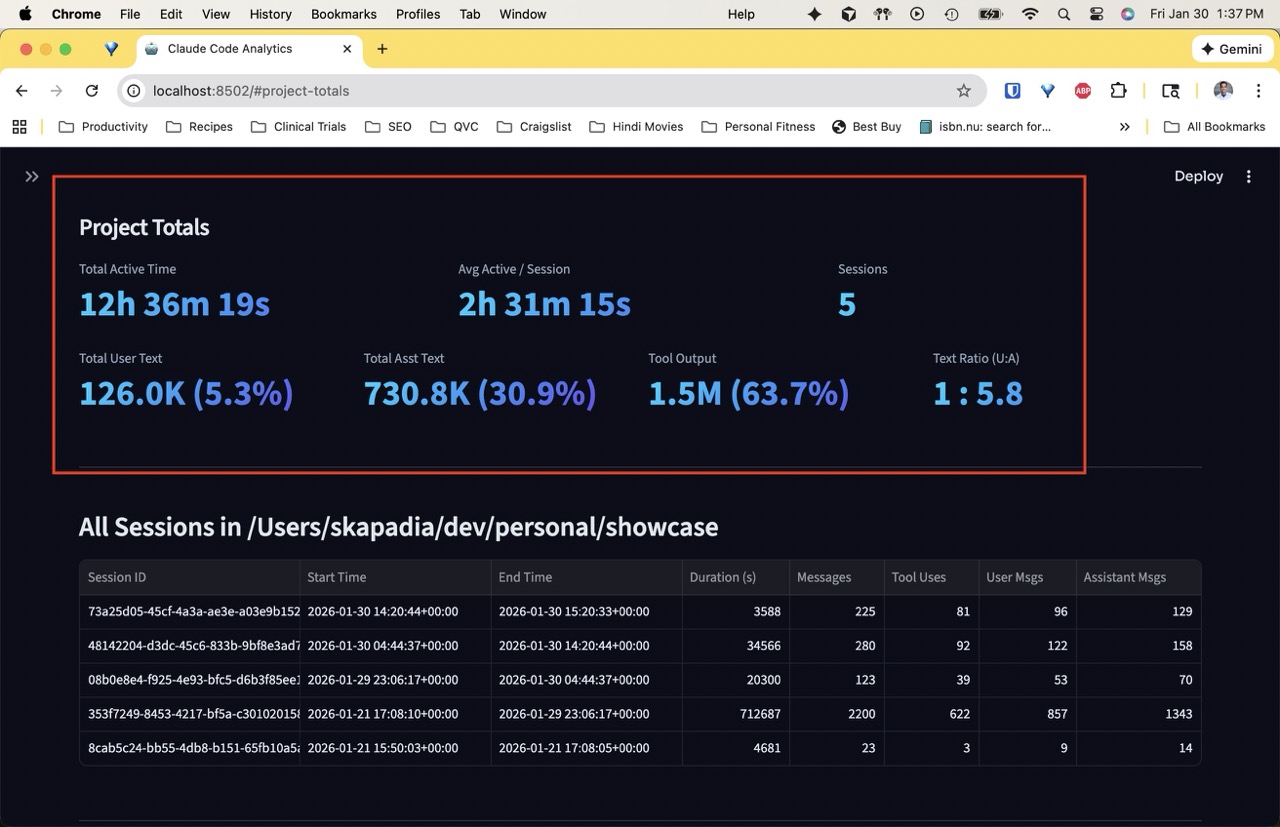
Project totals for claude-code-analytics showing active time, text volume by category, and user-to-assistant ratio

Automating the Data Pipeline

Showcase

The showcase site pulls data from several sources — GitHub, YouTube, LinkedIn, Chariot Solutions, and Medium. Initially, most of this was collected through one-off web scrapes and CLI commands. This week I built automated refresh scripts for each data source.

GitHub repos and YouTube videos were straightforward — gh repo list and yt-dlp with a playlist ID give clean, structured output every time.

LinkedIn required the csv-parse library to correctly handle multiline quoted fields in the LinkedIn export CSV.

Chariot Solutions content was the most interesting. I first tried using the Claude Agent SDK to replicate how the data was originally collected — having an LLM extract items from search result pages via WebFetch. It worked, but each run returned a different set of items (~59-62 out of 75). The small model inside WebFetch is non-deterministic. Switching to cheerio with CSS selectors gave a perfect 74/74 match every time. The script also fetches publication dates from individual post pages, caching them so subsequent runs skip already-dated entries.

Lesson: LLM-based extraction is great for one-off exploration, but for repeatable data pipelines, deterministic HTML parsing wins.

This post was produced by Claude Code.

Monolog v1.0 Released

Monolog

Released Monolog v1.0 with full support for custom templates, permalink generation, and HTML sanitization. The single-file microblogging framework is now production-ready.

Key features:

  • Custom template support with {{PLACEHOLDER}} syntax
  • GitHub Flavored Markdown rendering
  • Optional permalink generation with click-to-copy
  • HTML sanitization for XSS protection

Building the Showcase Site

Showcase

Started building the personal showcase website using Astro 5 and Tailwind CSS v4. The dark theme is inspired by astro.build's design with navy backgrounds and cyan/purple accents.

The site aggregates content from multiple sources:

  • LinkedIn posts
  • Medium articles
  • GitHub repositories
  • Speaking engagements

Monolog Template System

Monolog

Designed the template system for monolog. Templates use simple {{PLACEHOLDER}} replacement — no complex logic, no loops, no conditionals. This keeps the tool focused and predictable.

Available placeholders: SITE_TITLE, AUTHOR, TABLE_OF_CONTENTS, POSTS, YEAR.